+1 (415) 234 7510
 +971 52 901 6677
 +91 8780928142
 WhatsApp
 Email


































Table of Contents
In today’s business world, data analytics, business intelligence, and cloud-based data platforms are major investments. However, managing infrastructure costs remains a significant challenge, especially when computing resources are not used continuously.
Microsoft Fabric is a unified analytics platform that combines data engineering, data warehousing, real-time analytics, data science, and Power BI. Traditionally, organizations needed to provision a capacity SKU before running workloads, which meant paying for computing resources even when they were underutilized.
Microsoft is introducing a new approach to address this challenge: Microsoft Fabric Zero-Provisioned (F0) Capacity and On-Demand Billing.
These capabilities aim to make Fabric more accessible by allowing organizations to pay for supported compute workloads based on actual consumption, without committing to provisioned capacity in advance.
This approach could be particularly useful for businesses running pilot projects, occasional analytics workloads, seasonal operations, or applications with fluctuating computing requirements.
Businesses working with experienced Microsoft Fabric consultants can also identify suitable capacity models, optimize workloads, and develop cost-effective analytics strategies.
Let’s take a closer look at how Microsoft Fabric F0 capacity works, its advantages, and what companies should consider before adopting it.
What Is Microsoft Fabric Zero-Provisioned (F0) Capacity?
Microsoft Fabric F0 is a new capacity option designed to reduce the upfront computing commitment required to get started with Microsoft Fabric.
Traditionally, organizations select a Fabric capacity SKU, such as F2, F4, or higher, depending on their processing requirements. These capacities offer a fixed amount of computing power measured in Capacity Units (CUs).
The new F0 model allows organizations to access supported Fabric workloads without paying an upfront provisioned compute-capacity charge. Instead, supported workloads use on-demand billing, meaning charges are based on actual compute consumption.
In simple terms, businesses do not need to purchase computing capacity upfront just to test Fabric or run occasional workloads.
This simplifies the process of exploring Microsoft Fabric, testing analytics solutions, and gradually expanding data operations without immediately committing to continuously running capacity.
How Does Microsoft Fabric On-Demand Billing Work?
Microsoft Fabric’s on-demand billing model allows organizations to pay for computing resources based on actual workload consumption.
Unlike traditional capacity-based pricing, where businesses reserve a specific amount of computing power, on-demand billing provides greater flexibility for workloads that do not require continuous processing.
Microsoft is introducing two related capabilities.
1. Zero-Provisioned F0 Capacity
F0 is designed as an entry point for organizations that want to explore Microsoft Fabric without committing to upfront provisioned compute capacity.
Key characteristics include:
- No upfront provisioned compute-capacity charge.
- On-demand billing for supported categories.
- Access to Microsoft Fabric and OneLake.
- Compute charges based on actual consumption for supported workloads.
This can help businesses experiment with analytics solutions before investing in larger capacity options.
2. On-Demand Billing for F2 and Higher Capacities
Organizations already using Microsoft Fabric capacities can also benefit from on-demand billing.
With this option, administrators can move supported workload categories outside their shared capacity’s CU limit and pay separately for their actual consumption.
For example, a business running data engineering, data warehousing, and analytics workloads on an F8 capacity might experience occasional increases in warehouse processing.
Instead of upgrading the entire capacity to handle temporary demand, the organization could move the supported warehouse billing category to on-demand billing.
This allows other workloads to continue using the existing shared capacity while the additional workload is billed separately.
F0 Capacity vs. Traditional Microsoft Fabric Capacity
Understanding the difference between F0 and traditional capacity-based pricing can help organizations select an appropriate billing approach.
| Comparison | F0 Zero-Provisioned | Traditional F2 and Higher |
| Initial compute commitment | No upfront provisioned compute charge | Requires capacity provisioning |
| Billing approach | On-demand for supported categories | Provisioned capacity pricing |
| Compute usage | Based on actual consumption | Based on selected capacity |
| Best suited for | Pilots and intermittent workloads | Regular and predictable workloads |
| Cost management | Category-level spend limits | Capacity monitoring and optimization |
| Scalability approach | Consumption-based | Capacity-based |
The right choice depends on workload frequency, processing requirements, performance expectations, and budget.
Key Benefits of Microsoft Fabric F0 Capacity
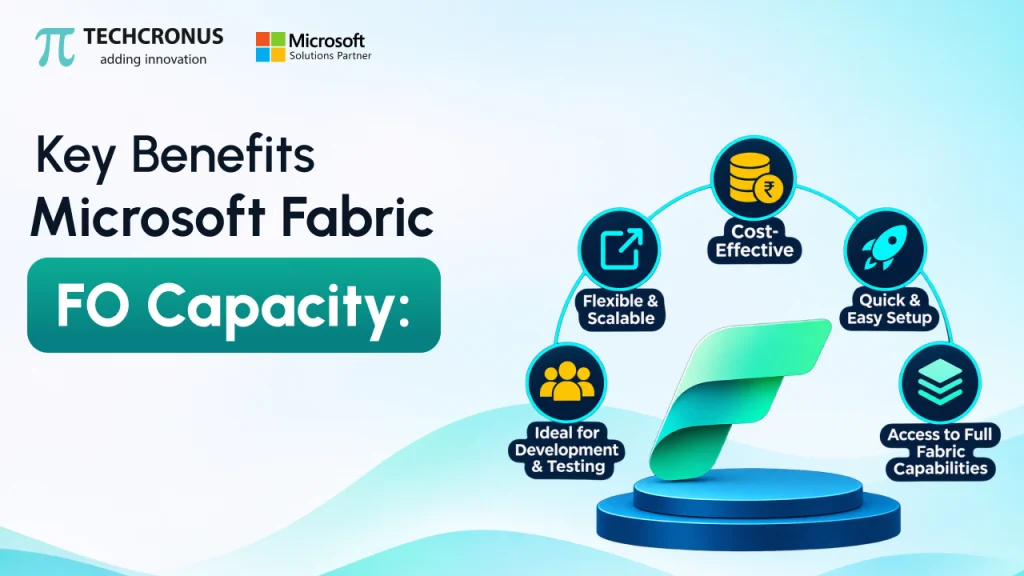
The introduction of zero-provisioned capacity and on-demand billing could change how businesses approach analytics infrastructure.
Here are five important benefits.
1. Lower Entry Barriers for Businesses
Getting started with enterprise analytics platforms can require infrastructure investments, licensing considerations, and technical planning.
F0 removes the upfront provisioned compute-capacity commitment for supported workloads.
This makes it easier for startups, small businesses, and enterprise teams to explore Microsoft Fabric before making larger infrastructure decisions.
For example, a company planning to migrate its reporting environment to Fabric can begin with an initial proof of concept and evaluate its requirements before selecting a long-term capacity.
2. Better Control Over Computing Costs
One of the biggest challenges with traditional cloud capacity models is paying for resources that remain underutilized.
Consider a business that runs intensive analytics workloads only during month-end financial reporting. Its computing requirements may increase significantly during the reporting period but remain relatively low throughout the rest of the month.
With on-demand billing, supported workloads can be charged according to actual compute consumption.
This creates an opportunity to align infrastructure expenses more closely with business activity and improve overall cost management.
3. Improved Handling of Workload Spikes
Not every business workload follows a predictable schedule.
Retail companies may experience increased analytics demand during holiday seasons, while financial organizations may require additional processing during monthly or quarterly reporting periods.
On-demand billing allows supported workloads to operate outside the shared capacity’s CU limit.
This helps isolate temporary processing demands instead of requiring businesses to increase the capacity of their entire Fabric environment.
4. Greater Flexibility for Development and Testing
Development teams often need computing resources for short-term activities, including:
- Data platform testing.
- Analytics proof of concepts.
- Dashboard development.
- Data transformation experiments.
- Machine learning experimentation.
Maintaining dedicated provisioned capacity for occasional development activities may not always be cost-effective.
F0 provides an alternative starting point for exploring supported Fabric workloads without an upfront compute-capacity commitment.
5. Better Cost Visibility and Governance
Cost flexibility is useful only when organizations can monitor and control their spending.
Microsoft is introducing additional cost management capabilities alongside on-demand billing.
Two important controls include:
Category-level spend limits: Capacity administrators can establish spending limits for individual on-demand billing categories. These limits are measured in CU-hours over a rolling 24-hour window.
Capacity Metrics app: A new On-demand compute tab provides visibility into consumption across billing categories, helping administrators understand which workloads are driving compute expenses.
These features can help IT and finance teams monitor resource consumption and establish better cost governance.
Practical Business Use Cases of Microsoft Fabric F0 Capacity
Different organizations have different analytics requirements. The flexibility of F0 and on-demand billing could benefit several business scenarios.
1. Business Intelligence and Reporting
Organizations frequently use Power BI and Microsoft Fabric to generate operational reports, financial dashboards, and management insights.
However, some reports are required only during specific periods.
For instance, a finance team might generate detailed reports at the end of every month. Instead of maintaining additional provisioned capacity for occasional reporting peaks, the organization could explore on-demand billing for supported workloads.
Integrating Microsoft Fabric with Dynamics 365 Business Central CRM can also help organizations bring financial, operational, and customer-related data together for more comprehensive reporting and business insights.
This can provide decision-makers with a more connected view of business performance.
2. Seasonal Retail Analytics
Retail businesses experience fluctuations in customer activity throughout the year.
During major sales campaigns, organizations may process higher volumes of transactional data, customer information, and inventory records.
On-demand billing can provide additional flexibility for supported workloads during these peak periods without requiring the entire Fabric capacity to be upgraded.
3. Data Engineering and ETL Projects
Data engineering teams work with pipelines that extract, transform, and load information from multiple sources.
Some pipelines operate continuously, while others run periodically.
For example, a manufacturing company may execute specific data transformation jobs every weekend to consolidate production, inventory, and supply chain information.
On-demand billing could offer a suitable option for supported workloads that do not require continuous computing resources.
4. Proof of Concept and Analytics Modernization
Organizations planning to modernize their data infrastructure often begin with a small proof of concept.
They may want to evaluate:
- Data integration capabilities.
- Lakehouse architecture.
- Data warehousing.
- Power BI reporting.
- Data engineering workflows.
F0 can lower the initial compute commitment associated with exploring supported Fabric workloads.
Once the proof of concept is complete, businesses can evaluate actual consumption and determine whether traditional provisioned capacity or on-demand billing is more appropriate.
What Should Businesses Consider Before Adopting F0 Capacity?
Although Microsoft Fabric F0 introduces a more flexible consumption model, businesses should evaluate several factors before adopting it.
1. Feature Availability
The announcement covered F0 and expanded on-demand billing as upcoming preview capabilities. Availability and timelines may change.
Organizations should check Microsoft’s official documentation for the latest availability information before planning production deployments.
2. Pricing and Billing Multipliers
Microsoft describes on-demand usage in CU-hours, with pricing based on a multiplier of the pay-as-you-go capacity rate.
The multiplier can vary depending on the billing category.
Businesses should avoid assuming that on-demand billing will always be cheaper than provisioned capacity. Actual costs depend on workload consumption and the applicable billing rates.
3. Workload Compatibility
Not every Microsoft Fabric workload is necessarily eligible for on-demand billing.
Organizations should identify which billing categories are supported and assess whether their existing analytics architecture can benefit from the new model.
4. Power BI Licensing Requirements
Compute capacity and Power BI licensing are separate considerations.
The F0 announcement does not automatically remove Power BI licensing requirements. Organizations should review the latest Microsoft licensing guidelines, particularly when sharing Power BI reports and dashboards.
5. Cost Optimization Strategy
On-demand billing is not necessarily the most economical choice for every workload.
Businesses with continuous and predictable processing requirements may benefit more from provisioned capacity, while intermittent workloads may be better suited to consumption-based billing.
A workload-level cost assessment is essential before selecting a pricing model.
F0 Capacity vs. On-Demand Billing vs. Capacity Overage
These three concepts are related to Fabric compute consumption, but they serve different purposes.
| Feature | F0 Capacity | On-Demand Billing | Capacity Overage |
| Primary purpose | Start without upfront provisioned compute | Pay separately for supported workload consumption | Handle compute consumption beyond capacity limits |
| Availability | Announced as upcoming preview | Announced as upcoming preview | Generally available, according to the referenced announcement |
| Billing basis | Actual supported compute consumption | Actual consumption by billing category | Additional compute above capacity |
| Configuration | F0 capacity | Enabled by capacity administrator | Applies when capacity exceeds its limits |
It is important not to confuse on-demand billing with capacity overage.
On-demand billing is an intentional configuration for supported workload categories. Capacity overage is associated with additional consumption beyond the provisioned capacity’s limits.
Understanding this difference helps organizations make more informed capacity management decisions.

How Techcronus Can Help Businesses Optimize Microsoft Fabric Costs
Adopting Microsoft Fabric is not just about selecting the right capacity SKU. Businesses also need a well-planned data architecture, workload assessment, governance strategy, and cost optimization approach.
At Techcronus, we help organizations modernize their data environments and build scalable analytics solutions using Microsoft technologies.
As an experienced Microsoft Fabric partner, Techcronus helps businesses implement and optimize modern data analytics environments according to their technical and operational requirements.
Our Microsoft Fabric consulting and implementation services can help businesses:
- Assess existing workloads: Evaluate current data processing requirements and identify opportunities for capacity optimization.
- Design scalable data architectures: Build modern data platforms using Microsoft Fabric, OneLake, and Power BI.
- Optimize computing resources: Identify the right combination of provisioned and consumption-based billing options.
- Implement data analytics solutions: Develop reporting environments and business intelligence solutions that support better decision-making.
- Establish cost governance: Configure monitoring, usage tracking, and spending controls to improve visibility into cloud expenditure.
When evaluating service providers, businesses can also explore the top Microsoft Fabric consulting companies to compare technical expertise, implementation experience, and industry knowledge before selecting an appropriate partner.
Whether you are exploring Microsoft Fabric for the first time or optimizing an existing analytics environment, Techcronus can help you identify an appropriate implementation strategy.
Conclusion
Microsoft Fabric Zero-Provisioned (F0) Capacity represents an important step toward making enterprise analytics more flexible and accessible.
By introducing on-demand billing and removing the upfront provisioned compute commitment for supported workloads, Microsoft is giving businesses another way to manage their analytics infrastructure.
For organizations running intermittent workloads, testing new analytics solutions, or managing seasonal demand, this model could provide greater flexibility and better alignment between computing costs and actual usage.
However, the most cost-effective approach will depend on workload patterns, supported billing categories, pricing, and licensing requirements.
Businesses should evaluate their existing Fabric environments and understand their consumption patterns before choosing between provisioned capacity and on-demand billing.
Looking to optimize your Microsoft Fabric environment?
Connect with Techcronus to explore scalable data analytics, Microsoft Fabric consulting, and cost optimization strategies for your business.
Contact Us to discuss your Microsoft Fabric requirements and discover how our experts can help you build a scalable and cost-effective analytics environment.
Frequently Asked Questions (FAQs)
1. What is Microsoft Fabric F0 capacity?
Microsoft Fabric F0 is a zero-provisioned capacity option designed to let businesses get started with Microsoft Fabric without an upfront provisioned compute-capacity charge. Supported workloads are billed based on actual compute consumption.
2. How does Microsoft Fabric on-demand billing work?
Microsoft Fabric on-demand billing charges supported workload categories based on their actual compute consumption, measured in CU-hours. Administrators can enable billing for eligible categories and configure spending limits.
3. Is Microsoft Fabric F0 free?
No. F0 should not be considered completely free. Although it removes the upfront provisioned compute-capacity charge, supported compute consumption is billed on demand. Storage and applicable licensing costs may also apply.
4. Who should consider Microsoft Fabric F0 capacity?
F0 may be useful for startups, development teams, businesses running analytics pilots, and organizations with intermittent or unpredictable workloads that want to explore Microsoft Fabric without an upfront compute-capacity commitment.
5. Can existing Microsoft Fabric users benefit from on-demand billing?
Yes. Organizations using F2 and higher capacities can also benefit by moving supported billing categories outside their shared capacity’s CU limit and paying separately for their consumption.